Weigh a spool and save the weight
Weigh the spool on the station, compare the result with Spoolman, and save it if you want to. Weighing on its own never changes Spoolman, and saving a weight never rewrites the tag.
Before you start
- The scale is calibrated. See Tare and calibrate.
- The tag is linked to a Spoolman spool. See Write or update a tag.
- To save the weight, Spoolman runs version 0.26 or 0.27. Other versions can be weighed against but not saved to; see Connect Spoolman.
- The spool has an initial weight in Spoolman, and its empty-spool weight is known (see Where the empty-spool weight comes from).
- The whole spool rests on the platform. Nothing else touches it, and no filament end or cable pulls on it.
Steps
Touchscreen
- Tap WEIGH on Home. The Weigh page opens and starts measuring. If you opened the page with Weigh in the bottom bar instead, tap WEIGH on that page. If the Home button reads CALIBRATE, the scale has no calibration yet.
- Keep the spool still. The page shows the weight on the scale ("GROSS WEIGHT (g)") and a state:
MEASURING, thenSETTLING, thenSTABLE. The message reads "Measuring. Keep the spool still." -
Read the result:
Line Meaning Empty spool The weight of the empty reel. Filament now What is on the scale minus the empty reel. In Spoolman The remaining weight Spoolman has right now. A value the station does not know is shown as "Not set".
-
The message tells you what saving will do, for example "Tap UPDATE SPOOLMAN to set its remaining weight to 712 g." Tap UPDATE SPOOLMAN to save. The message changes to "Saved to Spoolman."
- To measure again instead, tap WEIGH AGAIN.
The Weigh page shows a result only for the spool that is on the station now. If you swap the spool after weighing, the old result and UPDATE SPOOLMAN disappear and the page says "Tap WEIGH to measure this spool." With no spool on the station it says "Place a tagged spool on the station, then tap WEIGH."
Browser
- On the Dashboard, click Weigh. The Weigh spool dialog opens and starts measuring.
- Keep the spool still. The state goes from "Measuring…" to "Settling…" to "✓ Stable".
-
Read the result:
Row Meaning Gross measured The weight on the scale. Empty spool / tare The weight of the empty reel. Measured filament What is on the scale minus the empty reel. Spoolman currently The remaining weight Spoolman has right now. Difference Measured filament compared with Spoolman. A value the station does not know is shown as "—".
-
The message reads "Measured. Tap Update Spoolman to save it." Click Update Spoolman to save.
- To measure again, click Weigh Again (the button reads Retry after a failed measurement).
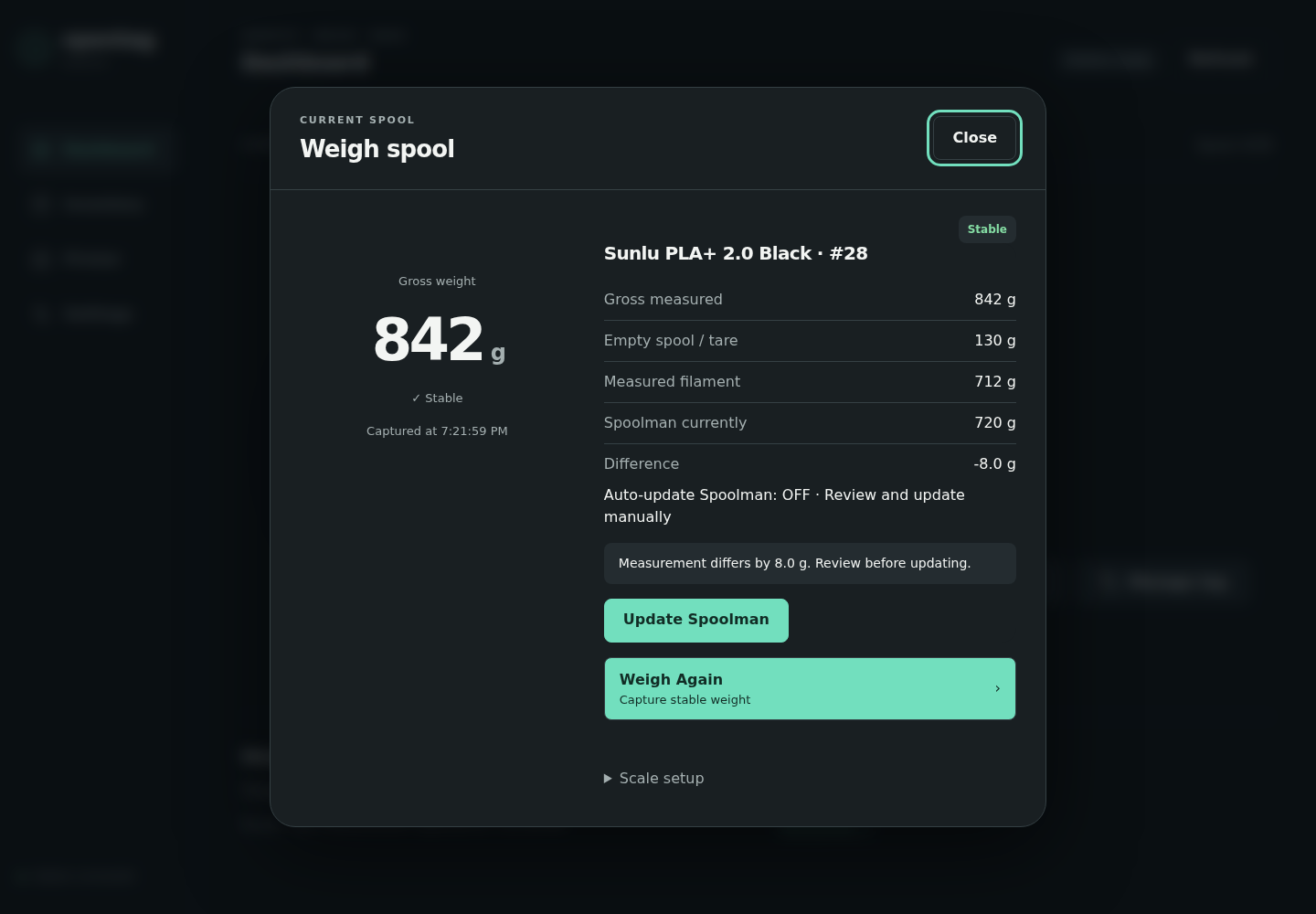
Demo data.
Good to know
- Each measurement can be saved once. To save again, weigh again.
- While a weight is being saved, you cannot start a new weigh. The browser's Weigh button is greyed out and reads "Saving to Spoolman…"; on the touchscreen the message reads "Saving to Spoolman...". If you ask anyway, the station says "Saving the previous weight to Spoolman. Try again in a moment."
- Leave the spool and its tag in place until the weight is saved. The station checks that the same tag is still on the reader before it writes to Spoolman.
- A measurement gives up after 20 seconds if the weight never settles.
- If the difference from Spoolman is within the tolerance (5 g by default), nothing is written and the message is "Spoolman already matches this weight. Nothing to update."
- A result up to 10 g above the spool's initial weight is saved as a full spool. Anything higher is refused.
Save automatically
Auto-update Spoolman after Weigh saves every completed measurement without a second tap. It is off by default.
- Touchscreen: Settings, then tap Auto-update OFF so it reads Auto-update ON. The change applies immediately.
- Browser: Settings → Scale → Weight updates, tick Auto-update Spoolman after Weigh, then click Validate and save.
With auto-update on, the message after measuring is "Measured. Saving to Spoolman..." and the browser hides the Update Spoolman button. The browser dialog shows "Auto-update Spoolman: ON · Captured Weigh only" or "Auto-update Spoolman: OFF · Review and update manually".
Auto-update only acts when you start a weigh yourself. A spool left sitting on the station never changes Spoolman.
The tolerance is next to it in the browser: Inventory matching tolerance (g). There is no tolerance control on the touchscreen.
Where the empty-spool weight comes from
The station subtracts the empty reel from the scale reading. It uses the first of these that holds a weight above 0 g:
- The spool in Spoolman (its empty-spool weight).
- The filament in Spoolman.
- The vendor (maker) in Spoolman.
- The tag.
A value of 0 g counts as "not set" and is used only when none of the four holds a real weight. A value in Spoolman always wins over the copy on the tag. The tag's value is used only when the spool, its filament and its vendor have none.
If something goes wrong
The message on the Weigh page (touchscreen) or in the Weigh spool dialog (browser) says why a weight cannot be saved.
| What you see | What it means | What to do |
|---|---|---|
| "The weight did not settle. Keep the spool still and weigh again." | The reading kept moving. | Steady the spool, check nothing touches it, weigh again. |
| "Measurement failed or timed out. No inventory update" | No stable weight within 20 seconds, or the scale reported a fault. | Weigh again. If it repeats, see Weight looks wrong. |
| "The scale is busy. Try again in a moment." | Another scale action is still running. | Wait, then weigh again. |
| "Saving the previous weight to Spoolman. Try again in a moment." | The last weight is still being saved. | Wait a few seconds, then weigh again. |
| "The scale stopped responding. Reconnecting to it; weighing is unavailable until it answers again." | The scale electronics stopped answering, for example after a short power drop. | Wait. The station reconnects by itself. |
| "This spool is not linked to Spoolman yet. Link the tag to a spool (Manage tag), then weigh again." | The tag is not linked to a spool. The same message appears when no tag is on the reader or Spoolman cannot be reached. | Link the tag (Write or update a tag), or check the tag and Spoolman, then weigh again. |
| "The empty spool weight is unknown. Set it on the spool in Spoolman, then weigh again." | Neither Spoolman (spool, filament, vendor) nor the tag holds an empty-spool weight. | Set the empty-spool weight on the spool in Spoolman. |
| "Spoolman has no remaining weight for this spool. Set its initial weight in Spoolman, then weigh again." | Spoolman cannot work out a remaining weight. | Set the spool's initial weight in Spoolman. |
| "The scale reads less than the empty spool weight. Check that the spool is on the scale and its empty weight is right." | The reading is lighter than an empty reel. | Seat the spool on the platform. Check the empty-spool weight in Spoolman. |
| "The weight tolerance setting is invalid. Check Settings." | The tolerance value is not usable. | Browser: Settings → Scale → Weight updates, fix Inventory matching tolerance (g). |
| "Saving weights is turned off: this Spoolman version has not been tested with this firmware, or Spoolman is offline. See Settings." | Shown after you ask to save. Spoolman is unreachable, or its version is not 0.26 or 0.27 (the only versions the station saves weights to). | Check that Spoolman is reachable and runs version 0.26 or 0.27. See Connect Spoolman. |
| "The spool on the station changed. Weigh again." | The tag was removed or swapped, or settings changed, after measuring. | Put the spool back and weigh again. |
| "Spoolman already matches this weight. Nothing to update." | The difference is within the tolerance. | Nothing. |
| "The measured filament (N g) is more than this spool's initial weight in Spoolman (M g). Check the empty spool weight, or correct the initial weight in Spoolman." | The result is more than 10 g above the initial weight. | Correct the empty-spool weight or the initial weight in Spoolman. |
| "This spool has no initial weight in Spoolman. Set its initial weight in Spoolman, then weigh again." | The spool has no initial weight. | Set it in Spoolman. |
| "Spoolman refused the new weight (HTTP 400). Check that the spool has an initial weight in Spoolman." | Spoolman rejected the value. | Set the spool's initial weight in Spoolman. |
| "Spoolman usage changed while this weight was being processed. No inventory value was overwritten. Weigh again" | Spoolman's used weight changed in the meantime, for example because a print used filament. | Weigh again. |