Identify a spool
Put a tagged spool on the station and it tells you which spool it is and how much filament Spoolman thinks is left. This page explains what each screen means and what to do next.
Steps
- Put one spool on the station with its tag over the reader. Keep other tags away from the reader.
- Wait a second or two. The station reads the tag, then looks the spool up in Spoolman straight away. It does not wait for the weight to settle, and it does this even if the scale is not calibrated yet.
- Read the result on the touchscreen Home page or the browser Dashboard page.
The reader starts once the station has joined your Wi-Fi. Right after first setup it also waits until the setup network has closed, about 30 seconds. Until then tags are ignored; see Tag is not detected.
What you see and what it means
| Situation | Touchscreen (Home) | Browser (Dashboard) | What to do next |
|---|---|---|---|
| Nothing on the reader | "OpenTag Station", "Place a spool", "Set a tagged spool on the station" | "Place a spool", with Write a new tag and Browse inventory | Place a spool. |
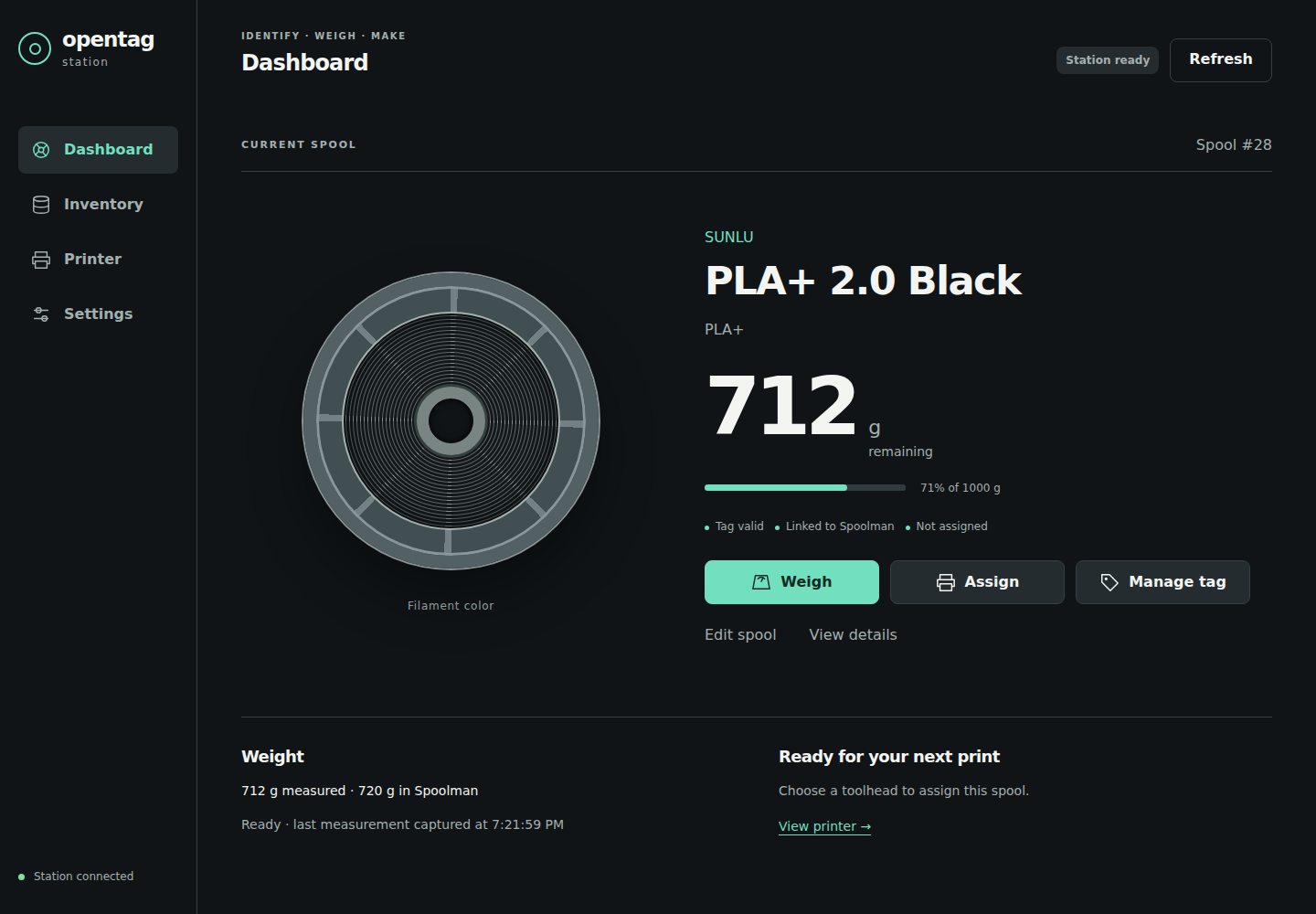
| Tag linked to a Spoolman spool | Maker, filament name, "Spool #N" and "NNN g remaining" (or "Weight not known") | "CURRENT SPOOL", "Spool #N", name, "N g remaining", "N% of M g", and the labels "Tag valid", "Linked to Spoolman" and "Not assigned" or the printer and toolhead | Weigh it, assign it to a toolhead or manage the tag. |
| Station is looking the spool up | "Finding this spool in Spoolman..." | "Looking up…", "Looking up this spool in Spoolman…" | Wait. |
| Tag has filament data but no Spoolman spool is linked | "Not linked yet: Manage tag > Link to a spool" | "Not yet linked", "Not linked to Spoolman" | Link it. See below. |
| Spoolman cannot be reached | "Spoolman unavailable; spool not looked up". Manage tag says "Spoolman is not reachable. The tag's link cannot be checked right now." | "Link not checked" and "Spoolman is not reachable; the link can't be checked right now. It will be looked up again when Spoolman is back." | Fix the connection (Spoolman problems) and leave the spool where it is. Once Spoolman answers again the station looks the spool up by itself, usually within about 30 seconds. |
| Blank tag | "COMPATIBLE BLANK TAG", "Ready to write", "Open Manage tag to choose a spool". The first button reads WRITE TAG. | "Blank tag", "Ready to write". The first button reads Write tag. | Write the tag. |
| Blank tag, or tag with other data, that Spoolman links to a spool | The spool's name, "Spool #N" and "NNN g remaining", with the normal WEIGH button | The spool's name, "Spool #N", its weight and "Linked to Spoolman", with the normal Weigh button | Weigh it, or write the tag to put the filament data on it. See below. |
| Tag the station cannot use | On the Tag page: "This tag can't be used as it is", a reason, and "Use a blank NXP ICODE SLIX2 tag." | Dashboard: "Reading spool…" and "Tag needs attention". In Manage tag: "Unsupported" and "OpenPrintTag decode failed / unsupported" | Use a blank NXP ICODE SLIX2 tag. See Which tags work. |
| Two or more tags on the reader | Home keeps showing "Place a spool". The Tag page shows "Two tags on the reader. Remove one." | In Manage tag: "Multiple NFC-V tags detected" (or "Multiple NFC-A tags detected") and "Remove extra tags and present exactly one tag." | Leave one tag on the reader. |
| NTAG or MIFARE tag (NFC-A) | Home: "TAG FOUND", "Tag type not supported yet" and the tag's kind, for example "NTAG or other Type 2 tag (NFC-A)". The Tag page shows the same with the tag's ID. | Dashboard: "Tag type not supported yet", "Not supported yet". In Manage tag: "Tag type not supported yet" with the tag's kind. | Nothing is read from such a tag yet. Use an OpenPrintTag on NXP ICODE SLIX2. See Which tags work. |
NFC-B and NFC-F tags are not seen at all. The screen keeps showing "Place a spool".
Demo data.
Tags Spoolman links to a spool
A tag does not need filament data on it to be recognised. When a blank tag, or a tag holding data the station cannot use, is placed, the station still looks its UID up in Spoolman. It shows the spool only for an exact link:
- on Spoolman 0.27 or later, the tag is in the spool's tag list in Spoolman (for example because you added it there yourself);
- on any version, the spool's
nfc_uidextra field holds the tag's UID.
A similar filament name is never enough for such a tag. If nothing links it, it is shown as a blank or unusable tag, as in the table above.
You can weigh the spool and assign it to a toolhead as usual. Manage tag still shows the tag as it really is (a blank tag shows "BLANK TAG" and WRITE TAG), because the tag itself holds no filament data.
Buttons on the main page
| Touchscreen | Browser | What it does |
|---|---|---|
| WEIGH | Weigh | Weighs the spool. See Weigh a spool and save the weight. On the touchscreen this button reads CALIBRATE until the scale is calibrated. |
| ASSIGN | Assign | Puts the spool on a printer toolhead. See Assign a spool to a toolhead. |
| MANAGE TAG | Manage tag | Writes, updates, moves or erases the tag. See Write or update a tag. |
| SETTINGS | Settings (left rail) | Opens the settings. |
| — | Edit spool | Opens the spool's Spoolman record for editing. See Find and edit spools and filaments. |
| — | View details | Opens the Manage tag dialog, which also shows the tag's UID. |
Link a tag the station does not recognise
A tag can hold valid filament data without Spoolman knowing which spool it belongs to, for example a tag written by another station. The station never creates a spool on its own for such a tag. You choose the spool.
Touchscreen
- Tap MANAGE TAG.
- If the station found likely matches, it says "This may be one of your Spoolman spools." Tap CHOOSE WHICH SPOOL and pick the right one under "Which spool is this?". Up to three choices are shown. With more, the screen says "More matches: choose in the browser."
- Otherwise tap LINK TO A SPOOL and pick the spool as described in Write or update a tag.
Browser
- Under the spool card, read the hint. It is one of:
- "More than one Spoolman spool matches this tag. Choose the spool on the station, then confirm."
- "No Spoolman spool matched. Enter its Spoolman ID to confirm a local mapping."
- Click one of the suggested spools, or type the spool's number into Confirm the Spoolman spool on this station.
- Click Confirm spool.
Compare the suggestions with the physical spool in your hand. A similar name is not enough when you own several spools of the same filament.
If something goes wrong
| What you see | What it means | What to do |
|---|---|---|
| The screen stays on "Place a spool" with a tag on the reader | The tag is neither NFC-V nor NFC-A, is too far from the reader, or the reader has not started yet | See Tag is not detected. |
| "Tag type not supported yet" | The tag is an NFC-A tag (NTAG, MIFARE). The station names it but does not read it yet. | Use an OpenPrintTag on NXP ICODE SLIX2. |
| "This tag can't be used as it is" | The tag holds data that is neither blank nor OpenPrintTag | Use a blank NXP ICODE SLIX2 tag. The station does not erase unknown data. |
| "Spoolman unavailable; spool not looked up" | The station could not reach Spoolman | See Spoolman problems. You do not need to lift the spool: the station looks it up again by itself once Spoolman is back. |